






















































Top Tip - Populate ALL of Your Ads Assets
Top Tip – Populate ALL of Your Ads Assets
Assets are the BONUS parts that Google may choose to display with your Ad in order to make it more relevant to customers.
Imagine your Google Ads is a Mr Whippy 🍦 and your Assets could be a flake, some chocolate sauce or sprinkles!
Some people are happy with just a plain and simple ice cream, but most are more inclined to want an ice cream with extras. This is why Google is so clever, it shows people the extras they like.
You only need two Assets to set up an Ad (Headlines and Descriptions) so you should focus on these first, but don’t overlook the other Assets, you don’t want to miss out on all their benefits, it could be imperative to your Ad Relevance!
Other Google Ad Assets consist of;
Business Logo & Business Name
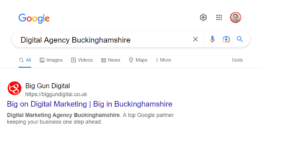
Business Logo
Having the logo will create familiarity for the customer if they are looking to go on your website again, people remember images more than names so this will be beneficial.
Having more information on your Ad maximises reach and visibility on relevant searches.
Business Name
Using your business name in your Ad can boost your campaign performance, Google sometimes use your business name in your Ads to help you reach more people.
Having your business name in your Ads allows people to know who you are, creating familiarity if they were to want to go onto your website again.
Headlines & Descriptions

Headlines
The headline is a required Asset on a Google Ad, it should focus on user benefits and be unique. The more headlines you enter, the more opportunities Google Ads has to provide ads more closely matched to potential customer searches, improving Ad performance. You can provide up to 15 headlines for a single responsive search Ad.
Descriptions
The description is also a required Asset on a Google Ad, it should be compelling and also focus on user benefits in a more informative way. You can provide up to 4 descriptions for a single responsive search Ad, the more you have the more opportunities there is for Google to match to searches.

Images
Image Assets are a great way for the customer to see what product/ service you provide, and if it’s what they are looking for straight away. They allow advertisers to upload relevant visuals to complement the existing text of the Ad. This is beneficial as a business can experience a 6% increase in click-through rate on average when having images included.
Customers are more likely to click onto an Ad if they can see what they are clicking on to.

Structured Snippets
These highlight specific aspects of your products/ services to help people instantly find out more about them. These show beneath the description. Having structured snippets can improve your ROI as adding additional information to your Ads can increase click through rates, therefore increasing interest to the product/service you provide.
Callouts
Callouts can promote unique offers to shoppers, like what you provide for example “face to face meetings” or “free shipping”. It is best to provide general information that applies to the entire business in a callout. They show customers what’s great about your business generally.
You can show up to 10 callouts on your Ad.
Call Button

Call
Call Assets let you add phone numbers to Ads, people can click or tap a button to call your business directly or go to your website. This can significantly increase click through rates, it also means more customer engagement with the Ads as well as ability to track conversions.
Location Information & Site Links

Location
The location is as simple as it sounds, It is the location of the business, informing any customers if they are local.Including location information means your Ads can display the address, a map and approximate travel distance to help people find you.Including opening times is informative as well as beneficial to customers.The location comes after the callouts in the Ad.
Site Links
Sitelinks take people to specific pages on your website. You can make these relevant to the search made through campaigns/Ad Groups to show more specific pages.
Sitelinks use conversion tracking for landing pages to get a better understanding of how many clicks you are getting and how effective they are.
Lead Form & Promotions

Lead Form
Lead form assets generate leads to drive sales for your business/products/service as well as driving leads into the marketing funnel to help get more conversions.Lead forms help generate leads by letting people submit their information in a form directly on the Ad.
Promotion
These assets can add more value to the Ad by highlighting sales and promotions for people that are searching for the best deals.
Using the promotion asset for customers searching for special offers or sales which are relevant to your business, holidays and events are a good time to use promotion Assets, like Black Friday.
Price

Price
Price Asset can add more value to your ads by giving a wider showcase of services/ products by linking them directly to what interests them on your site. Allowing people to find out what they want more quickly through the Ad.
They appear below the text of the ad, giving more space to tell people details about what your business offers.
Price Assets show as a set of up to 8 cards that people can view of the different options and prices you have.
From this people can go directly to the item that interests them on your site.