Team meeting on whiteboard

...Use Email Regularly?

Most businesses do, and in our opinion, although it is a very common and effective method of communication, its potential is often overlooked and so you’re leaving money on the table.

And just for clarity – These tips apply just as much to email at scale (email blasts and mail merges) as they do for personal emails that you send to carefully selected prospects, clients and suppliers.

1. Personalisation & Personality

People get hundreds of emails 📨📨📨 each day.

If you’re reaching out to someone for the first time by email and wish to be heard (or read), let alone receive a response and make a lasting impact, then you’d better bring your personalisation game.

If you don’t start an email with someone’s first name or at least something unique to them – it’ll be a miracle if you hear back.

Whether you’re reaching out to a prospect for the first time or you’re emailing a client for the 50th time, you should always be yourself. AI like Chat GPT is great but people are already starting to wise up to its occasionally robotic tone.

A USP of any business is its brand personality, and the personalities of its employees so;

  • Use your brands colours and fonts
  • Ask a question that is appropriate and shows you care
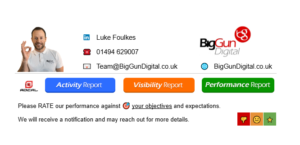
  • Have a smiley picture of yourself in the email signature
  • Have a signature specific to clients with commonly required resource links
  • Use emojis and memes for highlighting and humour

...Here's an example of a personalised email signature

2. The longer the string, the better

This is perhaps a more obvious tip but we always advise keeping strings of email communication going for as long as possible. It helps you to keep track of the whole conversation and allows you to skim back and refresh yourself on the important details instead of digging around in your inbox.

Not only that but if you end up needing to bring a team member up to speed, adding them to a comprehensive thread of emails can save a huge amount of time for all parties!

3. Harness the right software to bring the Magic

As mentioned above, staying on-brand is very important. Consistent branding strengthens your company and makes communications more effective, authoritative and memorable.

Employee Emails are a great place to further strengthen your brand, compound your values and highlight your campaigns etc.

For this, we strongly advise the use of a platform that allows the administration of ALL employee signatures in one place. We’ve tried them all but there’s only one that ticks all the boxes for us;

☁️ Cloud-based
Seamlessly integrates with Microsoft 365 and Google Workspace, delivering signatures server-side for ultimate consistency. Also offers client-side deployment for Outlook.

✨ Drag-and-Drop Brilliance
Boasts a market-leading, incredibly user-friendly drag-and-drop editor. Craft stunning signatures with ease, leveraging robust customisation options and a rich library of pre-designed templates. No HTML expertise needed!

🎯 Total Command
Gain unparalleled, granular control over every aspect of your organisation’s email signatures. Delegate access with role-based permissions for IT, Marketing, and HR teams, ensuring brand consistency across the board.

⚙️ Smart & Adaptive
Implement advanced rules to apply signatures dynamically based on sender, recipient, group, department, custom user attributes (from AD/Google Workspace), internal/external communications, and even CRM data (Salesforce, HubSpot).

📈 Unleash Marketing Power
Transform every email into a marketing opportunity! Schedule and deploy targeted banner campaigns, include clickable calls-to-action (CTAs), and track performance with in-depth analytics to measure your ROI.

📱 Universal Consistency
Say goodbye to mobile signature woes! Signatures are applied server-side, guaranteeing that every email sent from any device (desktop, web, or mobile) carries a perfectly formatted, on-brand signature.

⚖️ Legal Peace of Mind
Automatically append essential legal disclaimers, confidentiality statements, and disclosure notices. Smart rules ensure compliance with regulations like GDPR, HIPAA, and industry-specific mandates.

👍 Empower Your Teams
Designed with non-technical users in mind. Marketing and HR teams can confidently manage signature updates and campaign changes without relying on IT, thanks to the intuitive editor and flexible access controls.


OUR EMAIL SIGNATURE PLATFORM

4. Track engagement

You can only improve something if you understand its performance.
So unless you have a CRM that does it for you like Hubspot – you’ll need to manually track opens and clicks etc.

Apps like Boomerang can enable you to see if/when people open your email.

As for clicks on links, you should manually implement tracking on links with UTM link building tools like the Google Analytics Campaign URL Builder.

5. Utilise animation

Following on from the last point about ‘engagement’ – You’ll need to get creative to get the clicks in the first place.
And the best way to be engaging in an email is with the use of an animated gif.

Unfortunately – 99% of email platforms don’t support embedded video yet – You’d need to click the video image (or play button) to be taken to the web to watch the video.

Embedded Video 🎥 Support

So animated gifs are the most engaging method of communication.

These gifs can be video-like but the bigger the file size, the more impact it has on your deliverability so we recommend compressing as much as possible!

Embedded Gif 🎥 Support

6. Don't just Attach... embed and link too!

Another way to boost engagement is to embed images into the body of the email, as well as the signature area. Its not so commonly seen but this makes it more engaging to your prospects.

Better still, link these elements – In Gmail especially, its a bit fiddly, so again, its a competitive advantage.

So our advice is to do it all – attach, embed and link – that way there is something for everyone! Or best case, your prospect is one that endures the full triple threat.


Which is more engaging?

7. Verify your domain (DKIM, DMARC & BIMI)

DKIM (DomainKeys Identified Mail) and DMARC (Domain-based Message Authentication, Reporting, and Conformance) are foundational for proving email authenticity. They tell recipient servers that your emails are legitimate and haven’t been tampered with. This significantly improves deliverability, ensuring your marketing messages land in inboxes, not spam folders, by building a strong sender reputation with ISPs.

BIMI (Brand Indicators for Message Identification) takes this a step further. Once your domain is authenticated with DMARC at an enforcement policy (quarantine or reject), BIMI allows your brand logo to appear directly in the recipient’s inbox next to your “From” name.

This visual verification instantly boosts brand recognition and trust, making your emails stand out in a crowded inbox. Studies show BIMI can lead to higher open rates and increased consumer confidence, ultimately driving better engagement and conversions for your marketing campaigns. It’s a clear signal of legitimacy, protecting your brand from phishing attempts and building long-term customer loyalty.

Before & After BIMI

8. Try to steer clear of danger-words

Gmail and Outlook are always on the look out for words that are synonymous with spam to protect their users from bad experiences.

  • Embarrassing attempts at personalisation like – ‘Dear friend’
  • Excessive financial claims like ‘$$$’ or ‘make big money fast’
  • Obviously bad language and profanities
  • Drug related words
  • Also other extreme phraseology like ‘Urgent, don’t miss out’ or ‘100% Free – get yours today’

🤔 More Spam than your supermarkets’ tinned meat aisle

Before & After BIMI

9. Spell & Grammar check

Accurate spelling and grammar is perhaps the most fundamental of considerations when sending emails to important people… people you’d like to impress.

Luckily, these days, apps like Grammarly and even your CRM offer instant guidance for your spelling and punctuation so emails should go out without any mistakes – and that includes ensuring if you’re English, that you’re not using z’s instead of s’s! And vice-versa.

“A staggering 82.2% of professionals would definitely or maybe stop working with a provider who sent them copy with typos and errors.”

10. Freshen it up regularly

Then finally, just like a lot of things in life, it pays to be current and keep things fresh.

  • Change your profile picture
  • Change your email signature – layout, messages, photo etc.
  • Change your ad banner
  • Change your sign off – warm regards, cheers, many thanks, have a great day etc.

“A staggering 82.2% of professionals would definitely or maybe stop working with a provider who sent them copy with typos and errors.”

READY TO GO?

BRING IN THE BIG GUNS

BOOK A STRATEGY CALL

BOOK A STRATEGY CALL

I'd Like to Chat About...(Required)

PING US A MESSAGE 💬

This field is for validation purposes and should be left unchanged.
Services of Interest